Crafting with the Bead Organizer Box
There is a distinct satisfaction in organizing chaos, especially when that chaos consists of thousands of tiny, colorful beads scattered across a workbench. For crafters and small business owners who rely on precision and efficiency, the Bead Organizer Box Laser Cut Storage Box represents more than just a container; it is a testament to thoughtful design and functional artistry. This digital product is not merely a file you download; it is a blueprint for creating a highly customized storage solution that reflects your personal style while keeping your creative supplies meticulously arranged.
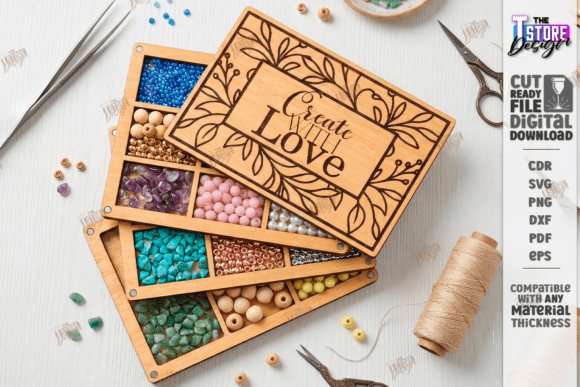
When we talk about this specific laser-cut project, we are discussing a blend of utility and aesthetic appeal. The design features clean lines and modular compartments that can be tailored to hold everything from seed beads to larger charms. The visual personality of this box is minimalist yet warm, relying on the natural grain of wood or the crisp finish of acrylic to carry its charm. It does not shout for attention but rather serves as a quiet, efficient partner in your crafting journey. Whether you are a hobbyist looking to tidy up your weekend projects or an entrepreneur preparing inventory for a craft fair, this organizer offers a professional touch that elevates the entire workspace.
Understanding the Design and Technical Precision
The core appeal of the Bead Organizer Box Laser Cut Storage Box lies in its technical precision. Designed specifically for laser cutting machines, this file set ensures that every cut and engrave is executed with accuracy. The instructions are straightforward yet critical for success: red lines indicate where the machine should cut, while black lines designate areas for engraving. This color-coding system is standard in the industry, but its implementation here is particularly user-friendly, reducing the risk of errors during the production phase.
However, working with digital files requires an understanding of software compatibility. The package includes a comprehensive zip archive containing SVG, EPS, PNG, PDF, and DXF files. This variety ensures that whether you are using Cricut, Silhouette, Glowforge, or industrial-grade CNC machines, you have a format that will work seamlessly. A crucial note for users of Lightburn software: SVG files can sometimes suffer from dimension distortion due to how different programs interpret vector data. To maintain the integrity of your design and ensure the pieces fit together perfectly without gaps or overlaps, it is highly recommended to use the DXF file format when working within Lightburn. This small technical adjustment can save hours of frustration and material waste.
The inclusion of inspirational quotes as part of the decorative elements adds a layer of emotional resonance to the piece. These engravings transform a simple storage box into a motivational tool, reminding the creator of their passion every time they reach for supplies. This attention to detail highlights the difference between a generic storage solution and a curated design asset that enhances the user experience.
Versatility Across Creative and Commercial Projects
While the primary function is storage, the applications of this laser-cut design extend far beyond the home studio. For entrepreneurs and small business owners, presenting materials in an organized, branded manner can significantly impact customer perception. Imagine displaying your handmade jewelry at a market, with beads sorted neatly in a box that bears your logo or a custom message. This level of presentation speaks to professionalism and care, reinforcing your brand identity before a single transaction takes place.
In the realm of packaging design, this concept can be adapted to create unique gift boxes for crafting kits. Subscription box services, in particular, benefit from such customizable inserts that protect contents while adding value through reusability. The modular nature of the design allows for scalability; you can produce multiple units to organize larger inventories or create tiered systems for different bead sizes. This adaptability makes it a valuable tool for anyone involved in creative font and design-heavy industries where presentation is paramount.
Furthermore, the aesthetic versatility of the box allows it to fit into various interior design styles. When crafted from light plywood, it complements Scandinavian or modern minimalist decor. When stained dark or painted, it can align with rustic or industrial themes. This flexibility ensures that the organizer does not look out of place in a living room or a dedicated craft office, making it a practical addition to any space where creativity happens.
Practical Guidance for Optimal Results
To get the most out of your Bead Organizer Box Laser Cut Storage Box, consider the material you choose carefully. Wood veneer offers a classic, warm feel and is easy to stain, but it may require sanding after cutting to remove char marks. Acrylic provides a sleek, modern look and is easier to clean, but it requires specific laser settings to avoid melting or cracking. Testing your machine’s power and speed settings on scrap material before committing to the final cut is always a wise practice.
When assembling the box, dry-fit the pieces first. This step allows you to check for any minor discrepancies in fit caused by material thickness variations. If you find that the slots are too tight, a light sanding of the edges can make assembly smoother. Conversely, if they are too loose, a small amount of wood glue can secure the structure permanently. Remember, the goal is a sturdy, long-lasting organizer that can withstand daily use.
For those interested in customization, the open nature of the SVG and DXF files means you can easily modify the design. You might want to add your name, change the inspirational quote, or adjust the compartment sizes to fit specific types of beads. This level of customization is what sets digital laser-cut files apart from mass-produced plastic organizers. It empowers you to create a tool that is uniquely yours.
If you encounter any issues with file compatibility or need a different format, reaching out to the creator is encouraged. Many designers are willing to assist with specific needs, such as providing alternative PNG colors or sizes for preview images. Engaging with the creator not only helps resolve technical queries but also supports the independent design community. Following the shop ensures you stay updated on future releases, which may include complementary designs like thread spool holders or tool racks, allowing you to build a cohesive organizational system over time.
Ultimately, the Bead Organizer Box Laser Cut Storage Box is more than a collection of vectors and cut lines. It is a resource that bridges the gap between digital design and tangible utility. By paying attention to the technical details, choosing the right materials, and embracing the customization possibilities, you can create a storage solution that enhances both your workflow and your creative environment. It is a small investment in order that yields significant returns in clarity, efficiency, and joy.